Quiniela Tena — from a spreadsheet to a self-running system
It started as a football prediction pool for coworkers and ended up as a system with runtime code generation, bank-email parsing, a Telegram bot, and a participation dashboard that didn't flatter anyone. This is how it's wired underneath and how its pieces connect.
The problem was never the football, it was the operations
The pool runs inside a WhatsApp group of 60+ people, across seasons (Liga MX, Leagues Cup, Champions League). Every round means building a prediction form, checking who answered, looking up results, posting a banner, detecting who paid, chasing who didn't, and announcing the winner. None of that is hard to do once. What's hard is doing it correctly, every week, for months, without a deposit or a prediction falling through the cracks. That's the problem worth automating — not scoring the picks, but everything that happens around them.
Ten years of tinkering: from an Excel sheet to five minutes of clicking
Before a single line of Firestore or Apps Script existed, the pool had already been running for years — by hand, in Excel, with a three-person team splitting the work. Here's how that line between "a person does this by hand" and "the system does this alone" kept moving:
An Excel sheet and a WhatsApp group
A weekend match list with Home/Draw/Away columns. Each player filled in the file and sent it back; the organizer typed every answer by hand into a tracking matrix and shared the updated table as an image in the group.
Google Forms, and a hand-made banner
Predictions move to a Google Form. In parallel, the visual banner is born: a club-crest database built in Excel, and a macro that generated each match as an image, one by one, until all 20 of the round were done.
Drive + Apps Script build the form on their own
With the banners already uploaded to Drive, an Apps Script assembles the Google Form automatically — one question per match, banner included. The manual work shrinks down to styling the already-generated form.
From Excel to a site on Firebase
Being the only one who could update and share the table gets old, which leads to looking for somewhere to host a real site. Firebase shows up, and with it Firestore. The first version only shows the table to the public — the result is still entered by hand, in admin mode.
ESPN, 365Scores, and everything in one click
The app starts reading ESPN's API to list the day's matches, and 365Scores for channel and venue — the banner now builds itself. One more click also generates the full Apps Script for the round: form, syncing, results, and notices, all in the same script.
A dedicated account reads the bank for you
A separate Google account, used only for banking alerts, feeds an Apps Script that reads deposit emails and loads them into a dashboard. The final assignment to each player stays manual — someone paying for several rounds at once, or paying on someone else's behalf, doesn't resolve itself.
Why Telegram, not WhatsApp
The bot was built on Telegram for cost reasons — its API is free, WhatsApp Business's isn't — and ended up sending 4 kinds of notice: someone registers, someone pays, a result gets posted, and someone wins the round. (The pool has run Liga MX, Leagues Cup and the Champions League since day one.)
The result of all those adjustments, stacked on top of each other over years, is best measured in people and minutes, not lines of code:
The organizer used to spend close to an hour, from finding the matches to sharing the form. The treasurer, another variable 30 minutes logging into the bank's app. The results tracker had no fixed time at all — the most irregular role of the three, because staying on top of every live score wasn't always possible, so everything ended up getting updated in one sitting at night. Today, one person covers the organizer's role in about 5 minutes of clicking, and results tracking no longer waits on anyone sitting down: ESPN reports it, the bot posts it, and the app updates itself.
Architecture: five pieces that share data, not code
The system is split across services that never talk to each other through an import — only through data. That turns out to be the single most important design decision in the whole project.
Admin panel (SPA)
It's the Quiniela Tena app itself — framework-free JavaScript, a single HTML file. It reads and writes one Firestore document per tournament over REST, and it's also where each round's Apps Script code gets generated — not shared, written out fresh.
Firestore
One state document per tournament (quiniela/state, quiniela/torneo_leaguescup…) with the full payload serialized into a single JSON field. Security rules allow get on a known document ID but block list — there is no way to enumerate tournaments, only to ask for one you already know.
Generated Apps Script
A distinct script per round, pushed straight to an Apps Script project through its REST API (not Drive, not copy-paste). It syncs the Google Form, checks results, renders the result banner, and fires the Telegram notices.
Telegram bot
One output channel for four distinct events: someone registers, someone pays, a result gets posted, and — the latest addition — a round has a winner.
Deposits (a separate project)
A second Apps Script project, under a different Google account, sharing nothing with the first. It reads the bank's email every 15 minutes, identifies the payer from the last 4 digits of their account, and writes to a spreadsheet that feeds a collections dashboard.
Integration map: how data moves between systems
None of these pieces share code, but all of them share data in a very specific sequence. Here's what one full round looks like, start to finish, crossing five different services:
Someone answers the Google Form
Every round has its own form, generated and uploaded along with the rest of that round's code.
Apps Script syncs that response to Firestore
The same state document the admin panel reads and writes — no browser needs to be open for that sync to happen.
It queries the ESPN API
As soon as a real score exists, the script pulls it automatically. No one looks up results match by match.
It asks a Cloud Run service to render the banner
Crests, score and text turned into an image ready to share — the browser is never involved in this.
The banner lands in Google Drive and gets posted to Telegram
Same channel already used for every other notice.
In parallel, Deposits reads Gmail every 15 minutes
A separate Apps Script project, under a different Google account, identifying payments straight from the bank's emails.
Every deposit gets written to a Google Sheet
That sheet feeds a web collections dashboard, and any new deposit fires a notice on the same Telegram channel.
Seven steps, five services (Forms, Firestore, ESPN, Cloud Run, Drive, Sheets, Telegram), and no human in the middle of the path.
One round's workflow, start to finish
The map above is the systems view. This is the operations view: what used to happen by hand, round after round, and what's still a human call versus what already runs on its own.
Pick the round's matches
The one decision still made by a person: which matches go into this round, entered in the panel.
Before kickoff
Broadcast channel and kickoff time
Reminder banner
After the final whistle
Score, scorers and red cards (ESPN)
Result banner
Notice posted to the Telegram group
Every automated box in this diagram used to be a tab opened by hand: checking the score on ESPN, checking for a red card, looking up the channel, building the banner in a design tool, uploading it to the group — four or five times per round, match by match. Today the only box still played by a person is the first one.
The pattern holding it all up: generate code, don't share it
Apps Script has no real cross-project library mechanism worth maintaining at this scale, and every round needs its own form, its own sync queue and its own triggers — with different data each time (teams, dates, which tournament is active). The fix that turned out simpler than fighting that limitation was to invert the problem: instead of deploying one reusable script, the admin panel builds the entire text of that round's Apps Script as a JavaScript template literal, with that round's data already baked in, and pushes it whole through the Apps Script REST API (PUT /v1/projects/{id}/content) every time a round goes live.
The cost of that pattern is that the business logic that actually matters — who won, how big the prize is — can't live in one place: it exists once in the browser (to show it in the panel) and once more inside the template that generates the Apps Script (so the bot can compute it on its own, with no browser open). Two implementations of the same rule, and keeping them in sync is, by a wide margin, the most repeated source of bugs in the whole project.
Catching those bugs before they reach production
Extract the generator function
The source of the function that builds the Apps Script text gets isolated by start/end markers, without touching the rest of the bundle.
Run it inside a Node vm sandbox
With a stub for document.getElementById (a getter/setter object acting as the "sink" for the generated text) and stubs for whatever app globals that function touches.
Syntax-check with new Function()
The generated text — the future Code.gs — gets compiled as a JavaScript function. A raw line break where one shouldn't be blows up right here, before it ever gets uploaded.
Run it with mocked Apps Script globals
PropertiesService, UrlFetchApp and Logger mocked, with test scenarios (ties, incomplete rounds, prize math with and without a season pot) to confirm behavior, not just syntax.
The same pattern verified, before anything was uploaded, the function that computes and announces each round's winner over Telegram — including the tied-winners case (the prize splits) and the guard against double-announcing if the trigger fires again on the same round.
Three Apps Script quirks that cost an afternoon of debugging if you don't know them
Triggers call with zero arguments
A time-based trigger always invokes the function with no parameters. A parameterized function registered as a trigger by mistake blows up with Invalid argument: value — a message that says nothing about the actual problem.
Web apps freeze at their deployed version
Pasting new code into the editor and saving does not update the /exec URL a dashboard calls. "Deploy → New deployment" is required explicitly. Regular project code (triggers) does run the latest saved version — two different rules inside the same product.
get yes, list no
This project's Firestore rules allow reading a document by a known ID but block enumerating the collection (403). The data design has to assume that from day one: every tournament needs a fixed, known ID — it's never discovered.
Inside the bot: what it looks like
The result banner is real — the bot generated it for Round 16. The Telegram channel and the deposits dashboard below it are illustrative recreations with placeholder data, not real screenshots.
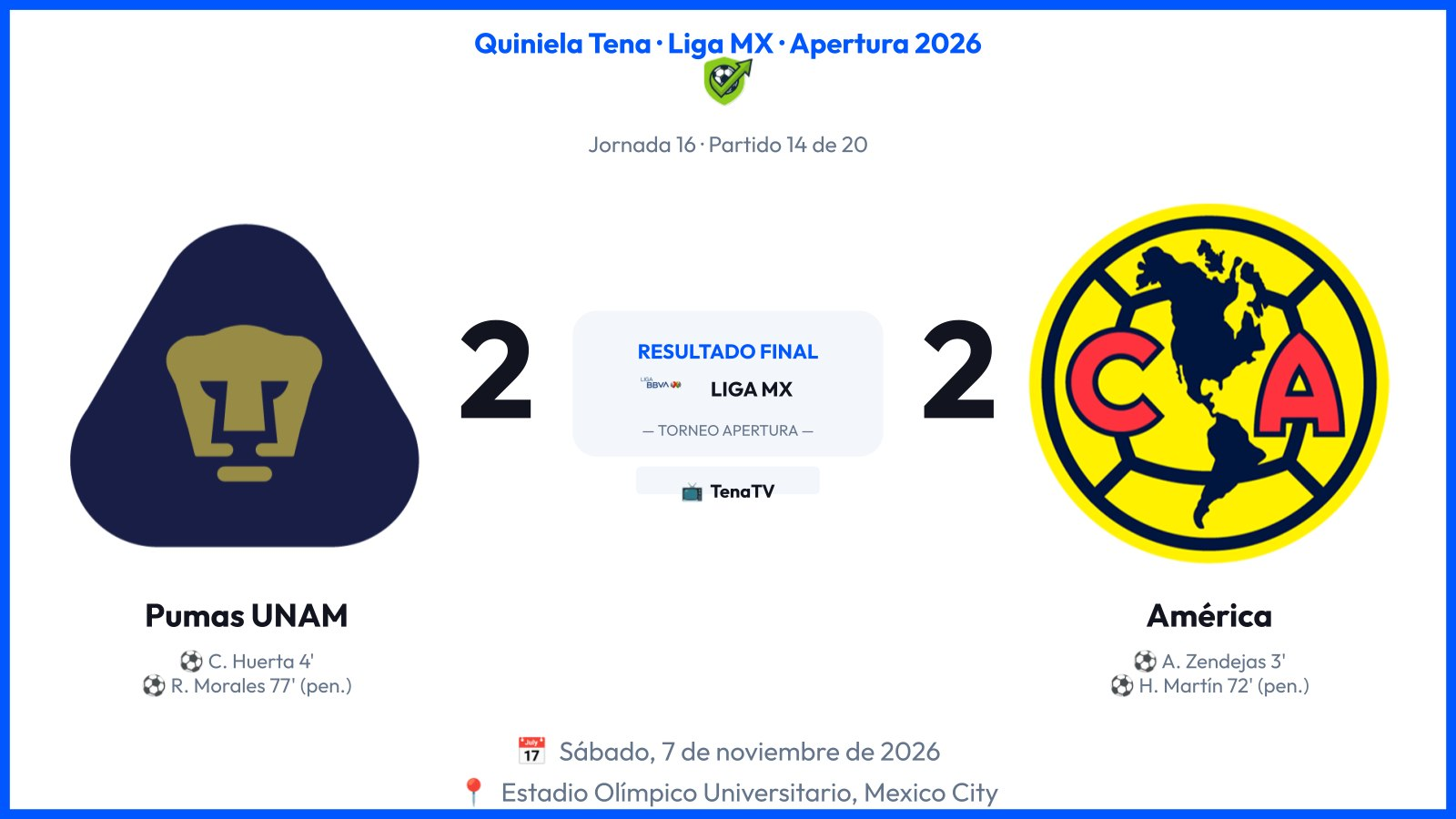
Real banner · generated automatically once Round 16's result closed
✅ New registration
Player 23 registered for Round 16.
💰 Deposit detected
From: Player 7 · Amount: $350.00
Account: ****8831
⚽ Result
América 2 – 1 Cruz Azul
Round 16
🏆 Round 16 winner
Player 11 with 14 correct picks.
Prize: $620 MXN.
One channel, four kinds of notice
Reassign is always available, not only when detection fails
What the bot already does on its own
Builds each round's form
Teams, dates and banners ready, nothing copied by hand.
Syncs predictions
The moment someone answers the form, with no manual check in the panel.
Publishes results and the banner
Looks up the score, renders a banner with crests and the final result, and posts it to the group.
Detects deposits and announces them
Reads the bank's email, identifies the payer by account, and tells the group who paid and how much — no one has to log into the bank to check.
Announces the winner
As soon as the round's last pending result lands, it computes who had the most correct picks (splitting the prize on a tie) and announces it — exactly once per round.
None of these steps needs anyone watching a chat or logging into a bank. Running the pool, round after round, stopped being a job a person has to do.